Thursday, 31 August 2023

Class IX - Computer Applications - Chapter 3: Elementary Concepts of Object and Class


Chapter 3: Elementary Concepts of Object and Class

Content 

------------------------------------------------------------------------------------------------------------------------------------------------------

1.Modelling Entities - Abstraction
2. About - Object
3. Class - The Object Factory
4. Class as a User Defined Data Types
5.Message passing between Object
6. Working with Blue J

------------------------------------------------------------------------------------------------------------------------------------------------------

 Data Types - Definition


Class IX - Computer Application - Chapter 4: Values and Data Types

  1. Chapter 4: Values and Data Types

Content 

------------------------------------------------------------------------------------------------------------------------------------------------------

1. Character Sets
2. ASCII Character Sets
3. Unicode Character Sets
4. Escape Sequence
5. Tokens
6. Data Types
7. Variables
8. Constants(Named and Symbolic Constants)

------------------------------------------------------------------------------------------------------------------------------------------------------

 Point at a Glance

  • A character Sett is defined list of character that can be used by a computer.
  • The ASCII character set is a 7-bit set of code that allows 128 different character set (27 =128)
  • The Extended ASCII code is a 8-bit character set that allows 256 different character(28 =256).
  • The Unicode character set uses between 8 and 32 bits per character so it can represent characters from written languages throughout the world.
  • An escape sequence is a set of characters that has a special meaning to the Java compiler. In an escape sequence, a character is preceded by a backslash ()
  • Java offers five tokens - keywords, identifiers, literals, punctuators, and operators
  • Keywords have a special meaning to the Java compiler.
  • Identifiers are used in a Java program to name things such as variables, methods, classes, objects etc.
  • Literal is a sequence of characters that represent values in a program and are stored in variables.
  • Punctuators are symbols used for grouping and separating the code.
  • Operators are symbols used to perform arithmetic or logical operations in a given expression.
  • Java offers two categories of data types - primitive and non-primitive.
  • There are eight primitive types in Java which are: byte, short, int, long, char, float, double and boolean.
  • A variable is an identifier that denotes a storage location in computer's memory to store a data value.
  • Memory locations whose values cannot be changed within a program are called constants or symbolic constants.
  • In Java, the modifier final can be applied to a variable declaration to ensure that the value stored in the variable cannot be changed after the variable has been initialized.   


Class IX - Computer Applications - Chapter 5: Operators in Java

                 Class IX - Computer Applications

 Chapter 5: Operators in Java

Content 

------------------------------------------------------------------------------------------------------------------------------------------------------

1. Operators and its forms

2. Operators -:Types

3. Operators - Precedence and Associativity

4. Operators - The new Operator

5. Operators - The dot(.) Operator

6. Operators - Expressions

7. Operators - Type Conversions

8. Operators - Output using println and print    

------------------------------------------------------------------------------------------------------------------------------------------------------

 Operators - Definition

  Operators are the symbols(+, -, *, /, %, &&, ||, !, >, <, <=,>=, ==, and ! =) which are used for doing calculations. 

 Operators - Types 
    Operators are of following types:-

  • Mathematical Operators
    • Unary                                      
      • Example int x=10, x++ ++x x-- or --x
    • Binary                                     
      • Example int x=10,y=5, z;  z=x+y, z=x-y
    • Ternary                                   
      • Example int res=(x>y)?60:70;
  • Relational Operators
    • > More than                            
      • Example int x=10, if(x>7)
    • < Less than                              
      • Example int x=10, if(x<7)
    • >= More than Equal to            
      •  Example int x=10, if(x>=7)
    • <= Less than Equal to             
      •  Example int x=10, if(x<=7)
    • == Equal to                             
      • Example int x=10, if(x==7)
    • != Not Equal to                        
      • Example int x=10, if(x!=7)
  • Logical Operators
    • Logical && (AND)
    • Logical || (OR)
    • Logical ! (NOT)

Operators - Precedence and Associativity

Category

Operators

Associativity

Postfix

                     ++ - -

Left to right

Unary

                     + - ! ~ ++ - -

Right to left

Multiplicative

                     * / %

Left to right

Additive

                     + -

Left to right

Shift

                     << >>

Left to right

Relational

                     < <= > >=

Left to right

Equality

                     == !=

Left to right

Bitwise  AND

&

Left to right

Bitwise XOR

^

Left to right

Bitwise OR

|

Left to right

Logical AND

&&

Left to right

Logical OR

||

Left to right

Conditional

?:

Right to left

Assignment

= += -= *= /= %=>>= <<= &= ^= |=

Right to left

Operators - The new Operator

The new Operator used to create object of a class.
              Example: Employee e = new Employee();
 

Operators - The dot(.) Operator

The dot(.) Operator used to access methods of a class
               Example:  e.CalSalary(); 
 
Operators - Expressions
                An expression is a combination of constants, variables, operators and methods calls, which are constructed according to the syntax of the language.
Types of Expressions
  • Arithmetic Expressions
  • String Expressions
  • Boolean(or Logical) Expressions   
Operators - Type Conversions
                A types conversion is a process of converting a value of one data type to another data type.
                Types of Conversions
  • Implicit Conversions

                                     When conversion done automatically  

  •  Explicit Conversions                    

                       When conversion done forcefully

Example: 

int x, y, z;
float  p=7.6F;


 Operators - Output using println and print   

 Logical


Operators - Very Short Answer Type Questions

Operators - Short Answer Type Questions

Operators - Programming Based Questions


Tuesday, 29 August 2023

IMPORTANT DEFINITIONS for ICSE - Computer Applications -Section A Asked in Board Exam

 Chapter 1: Revision of Class IX

Class IX Chapters 

Chpater 1: Revision of Class IX  

Introduction to Object Oriented Programming Concept

Q1.What is the default value of float and int? [I.C.S.E. 2015]

Ans:-
Data Type    Default Value (for fields)   Occupies memory
int          0                             4 bytes                    char         \0                            1 byte                    float        0.0f                          4 bytes  
long         0L                            16 bytes
float        0.0f                          8 bytes         
double       0.0d                          bytes                      long         0l                            bytes                      short        0                             bytes                    boolean     false                         1 byte                    byte         0                             1 byte    


Q2.Name two principles of OOP's?                  [I.C.S.E. 2015]
Ans:-
1. Inheritance 2. Polymorphism   
Q3.What are identifier?                           [I.C.S.E. 2015]Ans:-
1. Inheritance 2. Polymorphism 
Q4.Identifies the literals given below?
Ans:-
1. Inheritance 2. Polymorphism

Q5.What are Constants                                          Ans:Constants is a fixed value which does not change during the execution of a program or constants is the name memory location whose contents can not be changed during the execution of the program.  Example final int x=10;

Q6.What are Literal?                                            Ans:Literals in Java are a synthetic representation of boolean, character, numeric, or string data. They are a means of expressing particular values within a program. They are constant values that directly appear in a program and can be assigned now to a variable.

Q7. Why java is called Platform Independent?                      Ans:-Java is considered platform-independent because it can be written once and run on multiple platforms without any code changes. This is possible because Java source code is compiled into a universal bytecode that can be executed on any device with a Java Virtual Machine (JVM).

Q8 What are Data Types?                                          Ans:-Primary data types are also known as the fundamental data types because they are pre-defined or they already exist in the Java. All the other types of data types (derived and user-defined data types) are derived from these data types. Primary data types in Java are of 8 types: int, char, float, and double.


Sunday, 6 August 2023

JAVA PROGRAMS BASED ON CONDITIONAL STATEMENT AND USING SWITCH CASE

 JAVA PROGRAMS BASED ON CONDITIONAL STATEMENT

Conditional Statement

The statement which specify the conditions in following ways

1. Simple if : The conditional statement which have no else statement.

if(condition)

{ }     

2. Binary if: The conditional statement which have one 'if' and one 'else' statement.

if(condition)

{}

else

{}

3. Ladder if:The conditional statement which have one 'if' many if else () and one 'else' statement.

if(condition)

{}

else if(condition)

{}

else

{}

4. Nested if: The conditional statement which have one condition inside the other.

if(condition)

{

         if(condition)

         {}

}

else if(condition)

{}.

Switch Case Statement

SAMPLE PROGRAMS

Program 1:Write a program which accepts two numbers if first number is greater than second the squares the first number ad cubes the second number ans visa versa.

Solution:  

import java.util.*;import java.util.*;
public class Program1
{
    public static void main(String args[])
    {
        Scanner sc=new Scanner(System.in);
            int x,y;
            System.out.println("Enter First Number: ");
            x=sc.nextInt();
            System.out.println("Enter Second Number: ");
            y=sc.nextInt();
        if(x>y)
        {
            sq = x * x;
            cb = y * y * y;
        System.out.println("Square of First Number:"+sq);
        System.out.println("Cube of Second Number:"+sq);
        }
        if(y>x)
        {
            sq = y * y;
            cb = x * x * x;
        System.out.println("Square of Second Number:"+sq);
        System.out.println("Cube of First Number:"+cb);
        }           
    }
}

Program 2:Write a program which accepts choice from user if choice is '1' then checks Armstrong Number or if choice is '2' then checks Magic Number.

Solution:

import java.util.*;import java.util.*;
public class Program2
{
    public static void main(String args[])
    {
        Scanner sc=new Scanner(System.in);
            int armstr=0,mgcno=0,actno,no,choice;
            System.out.println("Enter Your Choice: ");
            choice=sc.nextInt();
        switch(choice)            
        {    
              case 1:
               //Checks Arm Strong Number
              System.out.println("Enter A Number:");
              no=sc.nextInt();
              actno=no;
              while(no>0)
              {
                 int p=no%10;
                 armstr=armstr*10+p;
          no=no/10;
              }
              if(actno==armstr)
              {
                   System.out.println("Its an ArmStrong Number!");
              }
              else
          {
               System.out.println("Its not an ArmStrong Number!");
              }
              break;
              case 2:
               //Checks Magic Number
              System.out.println("Enter A Number:");
              no=sc.nextInt();
              actno=no;
              while(no>0)
              {
                 int p=no%10;
                 mgcno=mgcno*10+p;
          no=no/10;
              }
              if(mgcno==10 || mgcno==1)
              {
                   System.out.println("Its a Magic Number!");
              }
              else
          {
               System.out.println("Its not a Magic Number!");
              }
              break;
     }
  }
}

Program 3:Write a program which accepts choice from user if choice is '1' then checks Perfect Number or if choice is '2' then checks Palindrome Number.

Solution:

import java.util.*;import java.util.*;
public class Program3
{
    public static void main(String args[])
    {
        Scanner sc=new Scanner(System.in);
            int preft=0,sum=0,prod=1palin=0,actno,no,choice;
            System.out.println("Enter Your Choice: ");
            choice=sc.nextInt();
        switch(choice)            
        {    
              case 1:
               //Checks Perfect Number
              System.out.println("Enter A Number:");
              no=sc.nextInt();
              perftno=no;
              for(int i=1;i<=no/2;i++)
              {
              
                 if(no%i==0)
                 {
                      sum=sum+i;
                      prod=prod*i;
                 }
              }
              if(sum==prod)
              {
                   System.out.println("Its a Perfect Number!");
              }
              else
          {
               System.out.println("Its not a Perfect Number!");
              }
              break;
              case 2:
               //Checks Palindrome Number
              int rev=0;
              System.out.println("Enter A Number:");
              no=sc.nextInt();
              actno=no;
              while(no>0)
              {
                 int p=no%10;
                 rev=rev*10+p;
         no=no/10;
              }
              if(rev==actno)
              {
                   System.out.println("Its a Palindrome Number!");
              }
              else
          {
               System.out.println("Its not a Palindrome Number!");
              }
              break;
     }
  }
}

PROGRAMS ASKED IN BOARD EXAMINATION

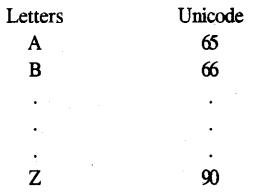
Program 1:Using the switch-case statement, write a menu driven program to do the following : (a) To generate and print Letters from A to Z and their Unicode Letters [I.C.S.E. 2019] Unicode                                                                   
ICSE Computer Applications Question Paper 2019 Solved for Class 10 - 1 

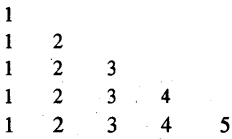
(b) Display the following pattern using iteration (looping) statement: 1

ICSE Computer Applications Question Paper 2019 Solved for Class 10 - 2

Solution:-

import java.io.*;
import java.util.*;
class SwitchCase {
public static void main(String args[ ]) {
Scanner sc = new Scanner (System.in);
System.out.println(” 1. Enter 1 for Unicode:”);
System.out.prindn(” 2. Enter 2 for Pattern:”);
System.out.println(“Enter your choice:”);
int choice sc.nextlntO;
switch(choice){
case 1:
char ch;
System.out.println( “Letters \t Unicode”);
for (ch = ‘A’; ch < = ‘Z’; ch+ +) {
System.out.println(ch +”\t” + (int)ch);
}
break;
case 2:
int i, j;
for (i = 1; i < = 5; i+ +) {
for (j = 1; j < = i; j + +)
{
System.out.print(j + “”);.
}
System.out.printlnO;
}
break;
default:
System.out.println(“Wrong choice entered:”);
}
}
}


Program 2: Write a program to input a number and check and print whether it is a Pronic number [15] or not. (Pronic number is the number which is the product of two consecutive integers)                [I.C.S.E 2018]
Examples : 12 = 3 × 4 .
20 = 4 × 5
42 = 6 × 7
Solution:

import java.io.*;
import java.util. Scanner;
class Pronic]
public static void main(String argsQ) throws IOException {
Scanner sc = new Scanner(System.in);
System.out.print(“Enter the number: “);
int n = sc.nextlnt();
int i = 0;
while(i * (i + 1) < n) {
i++;
}
if(i *(i + 1) = = n){
System.out.println(n + ” is a Pronic Number.”);
}
else {
System.out.prindn(n + ” is not a Pronic Number.”);
}
}
}

Program 3:Using switch statement, write a menu driven program for the following : [ICSE 2017]
(i) To find and display the sum of the series given below :
S = x1 -x2 + x2 – x4 + x5 – x20
(where x = 2)
(ii) To display the following series :
1 11 111 1111 11111
For an incorrect option, an appropriate error message should be displayed.
Solution:-

import java.io.*;
class SwitchStatement {
public static void main(String argsQ) throws IOException {
InputStreamReader reader = new InputStreamReader(System.in);
BufferedReader input = new BufferedReader(reader);
System.out.println(“l-Sum of Series:”);
System.out.println(“2-Display Special Series:”);
System.out.println(“Enter your choice:”);
String n1 = input.readLine( );
int ch = Integer.parselnt(nl);
System.out.println(“Enter Number of Terms
String t = input.readLine();
int n = Integer.parselnt(t);
switch (ch) {
case 1:
int sign = -1;
double term = 0;
double sum = 0;
int x = 2;
System.out.println(“Value of x: ” +x);
System.out.println(“Number of terms: ” +n);
sum + = x; // First term added here,
for (int i = 2; i < = n; i+ +){
term = sign * Math.pow(x,i);
sum + = term;
sign *= -1;
}
System.out.println(“Sum of Series +sum);
break;
case 2 :
int num;
System.out.println(“Enter the number of terms: ”);
String tm = input.readLine(); .
num = Integer.parselnt(tm);
int s = 0, c;
for (c = 1; c < = num; c+ +){
s = s * 10 + 1;
System.out.print(s + ” “);
}
break;
}
}
}


Sunday, 16 July 2023

Class as the Basis of All Computation

Chapter : Class as the Basis of All Computation

About Java Programming Language

Topics Covered

  • Java: An Introduction
  • Java Virtual Machine
  • Class Libraries
  • Java Character Set
  • Tokens
  • Keywords
  • Identifiers
  • Naming Convention of an Identifier
  • Literals and its types
  • Concepts of Data Types
  • Variables
  • Reference Types
  • Constants
  • Operators in Java
  • Expressions
  • Java Statements
  • Significance of Classes

 JAVA : AN INTRODUCTION

                             Java was first developed by James Gosling at Sun Micro systems. It was released in May 1995 as a core component of Sun Micro systems '. Java was basically designed for electrical and electronic appliances for the operation of it remove and touch screen and finally it was found that Java can be used as a Programming language. It is divided into two types of programming

  1. Java Applications
  2. Java Applets

 The original and reference implementation Java compilers, virtual machines, and class libraries were originally released by Sun under proprietary licenses.

Java compilers: - Compiler is a program used to compile and run Java program.

Java Virtual Machine:-  A Java virtual machine is a virtual machine that enables a computer to run Java programs as well as programs written in other languages that are also compiled to Java byte code. The J.V.M is detailed by a specification that formally describes what is required in a J.V.M.

Class libraries: - The Java Class Library is a set of dynamically loadable libraries that Java Virtual Machine languages can call at run time. Because the Java Platform is not dependent on a specific operating system, applications cannot rely on any of the platform-native libraries.

Tokens:-The Java compiler breaks the line of code into text (words) is called Java tokens. These are the smallest element of the Java program.

Keywords:- These are the reserve words used for writing Java code.

Identifiers:- Identifiers are the name given to different parts of the program.   

Naming conventions Identifiers :-

1. No Identifier (variable / array / method / class) name should starts with a java keyword.

2. There is no space between an identifiers name.

3. No special characters(such as !@#$%^&*) except _ and $.

4. No identifier should starts with a digit.

Literals and its types:- The physical value which is stored or assign in a variable are literals.

Integer Literal (23,44.44)- The integer values are integer literals 

Integer Literal of three types

  • Decimal (base 10)
  • Octal (base 8)
  • Hexadecimal (base 16)

Character Literal (A, B, a, b) - The character values are character literals

Floating Literals (23.43) - The small decimal values are float literals. Floating literal are also called Real literal.

Following are the

Double Literals (23.6889897) - The long decimal values are double literals

Boolean Literals (true,false) - The true-false values are boolean literals

Long Literals (38328236889897) - The long integer  values are Long literals

Shot Literals (45) - The shot integer  values are shot literals

Byte Literals (3) - The byte integer  values are byte literals

 
Concepts of Data Types

Sizes and values that can be stored in the variable can be specifies through data types. 

There are two types of data types in Java:

 1. Primitive data types: The primitive data types include

  • int   it helps to define integer data(2, 3, 4, -1, -4, -7 etc).           Ex int x=10;
  • char it helps to define character data(a, b, %, @, %, * etc).
  • float (23.43F, 3.33F etc).
  • short(22, 34, 44)
  • long(38829239392398L, 39990284884998949L)
  • boolean(true, false)
  • byte(3, 4, 4, 3 etc)
 2. Non-primitive data types: The non-primitive data types include Classes, Interface and Array.
             Class : A prototype definition having data member and member methods.

            Array: A collection set of similar values of same type.

           Interfaces: A collection of classes.

 
Reference Types
 
Constants
 
Operators in Java
 
Expressions
 
Java Statements
 
Significance of Classes


Friday, 14 July 2023

Conditional Statements [if..else]

 CONDITIONAL STATEMENT
IN JAVA

Topics Covered

  • Control Statements
  • Conditional Statement
  • Nested If
  • Switch..case default Statement
  • A limitation with switch..case
  • Break statement in switch
  • Lopping structure
1. Control Statements 

Control statements specify the order of execution of the instructions present in a program. These make it possible for the program to make certain decisions, perform various tasks repeatedly, or even jump from any one section of the code to a different section.

2. Conditional Statement
We can use these conditions to perform different actions for different decisions.Java supports the usual logical conditions from mathematics:
Less than a < b    
Less than or equal to a <= b 
Greater than a > b 
Greater than a >= b
Equal to a == b
Not Equal to a != b 

Java has the following conditional statements  
  • Use if to specify a block of code to be executed, if a specified condition is true
  • Use else to specify a block of code to be executed, if the same condition is false
  • Use else if to specify a new condition to test, if the first condition is false
  • Use switch to specify many alternative blocks of code to be executed
The if Statement
Use of the 'if statement' specifies a block of Java code to be executed if a condition got to be 
true
Syntax
if (condition) {
  // block of "if the condition is true"
}
Note:-  
1. if is in lowercase letters. 
2. Uppercase letters (If or IF) will generate an error.
Example:- 


The If..Else If Statement
Use of the 'if.elseIf statement' specifies a block of Java code to be executed if a condition got to be 
true or false means the binary condition. 
Syntax
if (condition) 
{
  // block of "if the condition is true" (if block statements)
}
else
{
  // block of "if the condition is false" (else block statement)
}
Note:-  
1. Never put a semi-colon after if(condition)
2. Semicolon will in each block statement ends.
Example:-

The If..Else..Else If Statement
Use of the 'if..ElseIf..Else statement' specifies a block of Java code to be executed if a condition got to be 
true or false means the binary condition. 
Syntax
if (condition) 
{
  // block of "if the condition is true" (if block statements)
}
else if(condition)
{
  // block of "else if the condition is false" (else-if block statement)
}
else
{
  // block of "if else the condition is also false" (else block statement)
}
Note:-  
1. Never put a semi-colon after if(condition)
2. Semicolon will in each block statement ends.
Example:-
Nested If Statement
Use of the 'Nested..Else statement' is if within an another if condition
Syntax
if (condition) 
{
  // block of "if the condition is true" (if block statements)

    if(condition)
    {
          // block of "Nested if the condition is true" (Nested-if block statement)
    }
    else
    {
          // block of "Nested if else's Block Nested if's if  condition is also false" (Nested-if block statement)
    }
}
else
{
       //block of Finally else 
}
Note:-  
1. Never put a semi-colon after if(condition)
2. Semicolon will in each block statement ends.
Example:-

PROGRAMS BASED ON CONDITIONAL STATEMENTS
Program 1: Write a program to input three numbers (positive or negative). If they are unequal then display the greatest number otherwise display they are equal. The program also displays whether the number entered by the users are "A; positive", "All Negative" or "Mixed Numbers".
Sample Input: 56, -15, 12
Sample Output:  The greatest number is 56
Entered numbers are mixed numbers.
Solution:-
 class Greatest {
  public static void main(String[] args) {
    // declaring double type variables
    double n1 = -1.0, n2 = 4.5, n3 = -5.3, largest,negative;
    // checks if n1 is greater than or equal to n2
       if (n1 >= n2) {
      // if...else statement inside the if block
      // checks if n1 is greater than or equal to n3
      if (n1 >= n3) {
        largest = n1;
      }
      else {
        largest = n3;
      }
    } else {

      // if..else statement inside else block
      // checks if n2 is greater than or equal to n3
      if (n2 >= n3) {
        largest = n2;
      }
      if(n1<0)
      {
          negative=n1
      }
      if(n2<0)
      {
          negative=n2;
      }
      if(n3<0)
      {
          negative=n3;
      }

          }
};


CLASS X TYPES OF NUMBERS

 CLASS X  TYPES OF NUMBERS List of types of Numbers 1. Arm Strong Number 2.  Co-prime Number 3. Duck Number [I.C.S.E 2024] 4. Magic Number  ...